
Smart Coffee: Could It Cause Jitters?
Quick answer
- Smart coffee, meaning coffee brewed using smart home devices or automated systems, doesn’t inherently cause jitters.
- Jitters are primarily caused by caffeine content, brewing method, and individual sensitivity.
- Smart coffee makers can influence brew strength and consistency, which indirectly affects caffeine intake.
- Over-extraction or under-extraction, sometimes influenced by automated settings, can alter taste and perceived strength.
- If you’re experiencing jitters, evaluate your coffee’s caffeine source and brewing parameters, regardless of automation.
- Adjusting grind size, brew time, or coffee-to-water ratio, even with a smart device, is key to controlling strength.
What this problem usually is (and is not)
- The feeling of jitters is almost always related to the amount of caffeine consumed.
- Smart coffee brewing technology itself does not add stimulants or alter the chemical composition of coffee beans.
- While smart features can automate brewing, they don’t change the fundamental properties of coffee that cause caffeine-related effects.
- This issue is not about the “smartness” of the machine but rather the coffee grounds, water, and brewing ratios it uses.
- It’s important to distinguish between the effects of caffeine and any perceived difference in coffee quality due to automation.
- This guide focuses on how brewing variables, which can be controlled by smart devices, might influence your caffeine intake and subsequent feelings.
Likely causes (triage list)
Water and Coffee Quality
- Coffee Beans: Are you using a particularly high-caffeine bean (like Robusta)? Confirm the type of beans you’re using.
- Freshness: Stale beans can sometimes lead to a less pleasant, harsher taste, which might be perceived as “off.” Check the roast date.
- Water Quality: Hard water or water with off-tastes can affect the final brew. Taste your water directly.
Grind Size and Coffee Ratio
- Grind Size: Too fine a grind can lead to over-extraction and bitterness; too coarse can lead to under-extraction and weakness. Check if your smart brewer has adjustable grind settings or if you’re using pre-ground coffee.
- Coffee-to-Water Ratio: Using too much coffee for the amount of water can result in a stronger, more potent brew. Verify the recommended ratio for your coffee maker.
If your smart brewer doesn’t have adjustable grind settings, consider a quality coffee bean grinder to ensure you’re using the perfect grind for your brew. This can significantly impact extraction and taste.
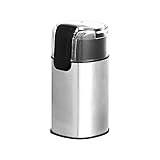
- Electric coffee bean grinder appliance for home use
- Can grind 30 grams/1 ounce of beans for drip coffee brewing in 10 seconds
- Grind coffee beans, herbs, spices, grains, nuts, and more
- Clear safety lid allows you to easily see the results in progress
- Heavy-duty stainless steel grind blade
Filter and Basket
- Filter Type: Paper filters absorb more oils than metal filters, potentially affecting the body and perceived strength. Ensure you’re using the correct filter type for your machine.
- Filter Placement: A poorly seated filter can cause grounds to bypass the filter, leading to a muddy, over-extracted cup. Visually inspect the filter basket before brewing.
Using the right coffee filter can make a difference in the final cup. Ensure you have the correct type of coffee filter for your machine to achieve optimal extraction.

- [100% Biodegradable & Pure] Clinuse disposable coffee filter paper is made from natural wood pulp, with zero bleach or fluorescent agents. The unbleached paper is completely adhesive-free, tasteless, and leaves no residue, keeping your coffee’s true flavor intact and your brew pure, hygienic, and eco-friendly.
- [Excellent Taste & Smooth Extraction] Crafted with fine, uniform-thickness paper, our V-shaped filter effectively removes excess oils and fine particles that cause bitterness, delivering a clean, mellow, and well-balanced cup. Because it’s entirely odor-free, nothing comes between you and the authentic taste of your beans.
- [V-Shaped Conical Design for Fuller Flavor] The specially designed V-shaped cone filter slows the water flow toward the center, allowing slower, deeper extraction and a richer, more aromatic brew. An easy-grip ear tab makes handling and cleanup simple — ideal for home, office, travel, or restaurant use.
- [Large Value Pack & Universal Fit] With 200 counts per pack, based on one cup daily, you’re set for over half a year of brewing. Designed to fit most 2-4 cup drip coffee makers, each filter measures approximately 6.3 x 4.6 x 4.4 inches. Please note: a reasonable variance of ±0.2 inches is normal. V02 is our model name and does not imply compatibility with other brands; always confirm your machine’s size requirements before purchase
- [Food-Grade Vacuum Packaging] To guarantee absolute freshness and purity, our coffee filters come sealed in food-grade vacuum packaging, keeping them dry, clean, and odor-free until use. From natural pulp to final package, every step meets strict hygiene standards — so every cup you brew is safe, clean, and worry-free
Machine Setup and Cleaning
- Brewing Temperature: While less common with modern machines, inconsistent or incorrect brewing temperatures can affect extraction. Consult your smart coffee maker’s manual for temperature specifications.
- Scale Buildup: Mineral deposits can clog water flow and affect heating, leading to inconsistent brews. Look for visible scale or unusual noises during brewing.
- Machine Settings: Ensure your smart coffee maker is programmed with the correct settings for your desired brew strength and volume. Review the app or device interface.
Fix it step-by-step (brew workflow)
1. Confirm Coffee Bean Type:
- What to do: Check the packaging of your coffee beans. Note if they are Arabica, Robusta, or a blend.
- What “good” looks like: You know the specific type of bean you’re using, allowing you to understand its typical caffeine profile.
- Common mistake: Assuming all coffee beans have similar caffeine levels.
- How to avoid: Always check bean packaging. If using a generic blend, consider trying a known single-origin Arabica for a baseline.
2. Adjust Coffee-to-Water Ratio:
- What to do: Measure your coffee grounds precisely using a scale. Aim for a common ratio, like 1:15 to 1:18 (e.g., 1 gram of coffee to 15-18 grams of water).
- What “good” looks like: Consistent brew strength that matches your preference without being overly intense.
- Common mistake: Using scoops, which are inaccurate, or guessing the amount of coffee.
- How to avoid: Invest in a simple kitchen scale for precise measurements. Refer to your smart coffee maker’s manual for recommended ratios.
To nail the perfect coffee-to-water ratio every time, a reliable coffee scale is essential. This tool ensures consistent measurements, which is key to controlling brew strength and avoiding jitters.

- Barista-Level Precision: A 0.1g high-precision sensor with a rapid refresh rate responds instantly to changes in weight, helping you achieve consistent results across espresso, pour over, drip coffee, Chemex, V60, and filter coffee brewing.
- Integrated Brew Timer: A built-in count-up and count-down timer tracks bloom, extraction, and espresso shots. Ideal for dialing in espresso, timing Chemex and V60 pour over recipes, or steeping tea. Auto-shutoff helps preserve battery life between brews.
- Durable Waterproof Silicone Cover: The heat-resistant, dishwasher-safe silicone cover helps protect the coffee scale's spacious 5.25" x 5.25" weighing surface from splashes, spills, and hot equipment. The grooved surface provides added stability and makes cleanup quick and easy.
- Versatile Measurement Options: Quick-tare and 6 unit options make it easy to weigh coffee beans, espresso shots, matcha portions, and more. Choose from g, ml, lb, lb:oz, oz, and fl oz for added flexibility in the kitchen and coffee bar.
- Intuitive Design: A bright dual-color LCD display clearly separates weight and timer readings, while simple controls make daily brewing easy. Includes 3 AAA batteries and is backed by 5 years of coverage, with support from our St. Louis-based team whenever you need a hand.
3. Select Appropriate Grind Size:
- What to do: If your smart brewer has adjustable grind settings, select a medium grind for drip coffee. If using pre-ground, ensure it’s labeled for drip coffee makers.
- What “good” looks like: Coffee grounds that look like coarse sand.
- Common mistake: Using espresso-fine grounds for drip coffee, which clogs the filter and over-extracts.
- How to avoid: If grinding your own beans, start with a medium setting and adjust based on taste. If using pre-ground, buy “drip” or “automatic drip” grind.
4. Ensure Proper Filter Use:
- What to do: Rinse paper filters with hot water before adding coffee grounds to remove papery taste. Ensure the filter is seated correctly in the basket.
- What “good” looks like: A clean filter, free of paper taste, sitting snugly in the basket without gaps.
- Common mistake: Not rinsing paper filters or having the filter fold over, allowing grounds to escape.
- How to avoid: Always rinse paper filters. Check the filter’s seal in the basket before adding coffee.
5. Verify Water Quality:
- What to do: Use filtered water. If your tap water tastes strongly of chlorine or minerals, it can affect the brew.
- What “good” looks like: Clean, neutral-tasting water.
- Common mistake: Using heavily chlorinated tap water, which can impart an unpleasant flavor.
- How to avoid: Use a Brita pitcher or similar filter for your brewing water.
6. Program Smart Brewer Correctly:
- What to do: Double-check the settings in your smart coffee maker’s app or on the device itself. Ensure brew strength and volume are set as intended.
- What “good” looks like: The machine is set to brew your preferred strength and the correct amount of coffee.
- Common mistake: Accidentally selecting a “bold” or “extra strong” setting when you want a milder brew.
- How to avoid: Familiarize yourself with your smart device’s interface and settings before brewing.
7. Check Brewing Temperature (if adjustable):
- What to do: If your machine allows temperature adjustments, aim for the ideal range of 195-205°F (90-96°C).
- What “good” looks like: Coffee brewed within the optimal temperature range for proper extraction.
- Common mistake: Brewing too cool, which results in weak, sour coffee, or too hot, which can scorch the grounds.
- How to avoid: Consult your manual for recommended brewing temperatures.
8. Taste and Adjust:
- What to do: After brewing, taste the coffee. If it’s still too strong or causing jitters, consider slightly reducing the coffee dose or using a coarser grind next time.
- What “good” looks like: A cup of coffee that tastes balanced and doesn’t lead to unwanted jitters.
- Common mistake: Not making adjustments after the first brew.
- How to avoid: Treat brewing as an iterative process. Small adjustments can make a big difference.
Prevent it next time
- Clean Regularly: Follow your smart coffee maker’s cleaning schedule, typically weekly for the carafe and brew basket, and monthly for internal cleaning.
- Descale Periodically: Descale your machine every 1-3 months, depending on your water hardness, to prevent mineral buildup.
- Use Filtered Water: Store your brewing water in a clean, sealed container.
- Measure Coffee Precisely: Always use a scale for coffee grounds and water to maintain a consistent ratio.
- Grind Appropriately: Use the correct grind size for your brewing method; medium for drip.
- Check Bean Origin: Be aware of the caffeine content differences between Arabica and Robusta beans.
- Inspect Filters: Ensure filters are properly seated and the correct type for your machine.
- Review Smart Settings: Periodically check your smart coffee maker’s programmed brew strength and volume.
- Listen to Your Body: Pay attention to how much caffeine you’re consuming and how it affects you.
- Safety First: Ensure the machine is unplugged before any deep cleaning or maintenance.
Common mistakes (and what happens if you ignore them)
| Mistake | What it causes | Fix