
Creating Your Own Coffee Table Book
Quick Answer
- Gather your best photos: High-resolution is key.
- Pick a theme: A cohesive story makes it pop.
- Write compelling captions: Tell the story behind the shots.
- Choose a book size and layout: Think about how it will look open.
- Select a printing service: Quality matters for a coffee table book.
- Design it yourself or hire a pro: Your call, but make it look sharp.
Who This Is For
- Photographers: You’ve got the shots, now make them a statement piece.
- Families: Preserve memories in a tangible, beautiful way.
- Hobbyists: Share your passion, be it vintage cars or exotic plants.
What to Check First
Photo Quality
This is non-negotiable. Your photos need to be sharp, well-lit, and high-resolution. Blurry or pixelated images will ruin the whole vibe. Aim for at least 300 DPI for printing.
Theme and Narrative
What’s the story you’re telling? Is it a travelogue of your favorite spots, a collection of your pet’s funniest moments, or a deep dive into a specific subject? A clear theme makes the book feel intentional and engaging.
Target Audience
Who are you making this for? Yourself? A gift? A wider audience? This impacts your tone, subject matter, and the overall feel of the book.
Book Size and Format
Consider the dimensions. A large, landscape format might be great for sweeping vistas, while a square book could work for portraits. Think about how it will sit on a coffee table and how easy it is to flip through.
Step-by-Step: How to Make a Coffee Table Book
1. Define Your Theme:
- What to do: Settle on the core subject or story for your book.
- What “good” looks like: A clear, focused idea that excites you.
- Common mistake: Trying to cram too much in. Keep it focused.
2. Curate Your Photos:
- What to do: Go through your images and select the absolute best.
- What “good” looks like: High-quality, impactful photos that fit the theme.
- Common mistake: Including filler shots or images that are technically poor. Be ruthless.
3. Organize Your Content:
- What to do: Arrange your photos in a logical sequence that tells your story.
- What “good” looks like: A flow that makes sense and keeps the reader engaged.
- Common mistake: Randomly dumping photos. A narrative arc is important.
4. Write Captions and Text:
- What to do: Craft compelling captions, introductions, or longer narratives.
- What “good” looks like: Text that adds context, emotion, or information without being overwhelming.
- Common mistake: Too much text, or captions that are too generic. Make them count.
5. Choose Your Book Specs:
- What to do: Decide on the size, orientation (portrait, landscape, square), paper type, and binding.
- What “good” looks like: Specs that complement your content and desired aesthetic.
- Common mistake: Picking specs that don’t suit the photos or feel cheap.
6. Select a Design Method:
- What to do: Decide if you’ll use online design software, hire a graphic designer, or use desktop publishing software.
- What “good” looks like: A method that allows you to create a professional-looking layout.
- Common mistake: Underestimating the design work involved if you DIY.
Consider using dedicated coffee table book design software to help you create a professional-looking layout with ease. This can streamline the design process significantly.

- Hardcover Book
- Lewis, Amber (Author)
- English (Publication Language)
- 288 Pages - 10/27/2020 (Publication Date) - Clarkson Potter (Publisher)
7. Design Your Layout:
- What to do: Place your photos and text on each page, paying attention to white space and visual hierarchy.
- What “good” looks like: A clean, balanced, and aesthetically pleasing layout.
- Common mistake: Cluttered pages, inconsistent spacing, or images that are too small.
8. Proofread Everything:
- What to do: Carefully check all text for typos, grammatical errors, and factual inaccuracies.
- What “good” looks like: Error-free text. Seriously, read it aloud.
- Common mistake: Skipping this step and ending up with embarrassing errors.
9. Choose a Printing Service:
- What to do: Research and select a reputable print-on-demand or local printer.
- What “good” looks like: A printer known for quality photo reproduction and good customer service.
- Common mistake: Going for the cheapest option without checking reviews.
When choosing a printing service, look for a reputable photo book printing service that specializes in high-quality photo reproduction to ensure your book looks its best.

- Perfect Gift:The photo book is a stunning gift to be cherished by all taking a trip down memory lane to relive wonderful moments
- Personalized Photo Album: The photo is printed by us on the photo book, No need to paste it manually,Simply upload your favorite images the finished product is like a beautiful magazine
- Special Moments: Celebrate the big moments in your life, great for weddings family photos vacations graduations Christmas, Mother's Day, Valentine's Day, Birthday, Anniversary gifts
- High-Quality: Your images appear crisp, vivid, and full of life as a result of Laser digital printing that produces a product of the highest quality, Premium photo papers adds a touch of shimmer and silky feel to your photos
- Satisfaction Guarante: We'll produce your item with as much care as you put into making it,you will receive high-quality products and only the best customer sercic
10. Upload and Order:
- What to do: Follow the printer’s instructions to upload your final files and place your order.
- What “good” looks like: A smooth ordering process and a confirmation email.
- Common mistake: Not double-checking file formats and resolution requirements before uploading.
11. Review Your Proof Copy (if offered):
- What to do: If your printer offers a physical proof, order and inspect it thoroughly.
- What “good” looks like: The proof matches your expectations for color, clarity, and layout.
- Common mistake: Skipping the proof to save time or money, and regretting it later.
12. Print Your Final Book:
- What to do: Once you’re happy with the proof (or if you skipped it), place your order for the final print run.
- What “good” looks like: Receiving a beautiful, high-quality book.
- Common mistake: Rushing the final order without a last sanity check.
Common Mistakes (and What Happens If You Ignore Them)
| Mistake | What It Causes | Fix |
|---|---|---|
| Using low-resolution images | Pixelated, blurry photos that look unprofessional. | Always use high-resolution (300 DPI minimum) images. |
| Inconsistent photo quality | Some pages look great, others are washed out or too dark. | Curate strictly for quality and edit photos to a consistent look and feel. |
| Cluttered page layouts | Overwhelmed reader, hard to focus on individual photos or text. | Embrace white space. Let your images breathe. Keep layouts clean and simple. |
| Poorly written or generic captions | Missed opportunities to add depth, context, or personality. | Write engaging, informative captions. Tell the story behind the shot. |
| Ignoring proofreading | Typos, grammatical errors, and factual mistakes that undermine credibility. | Proofread multiple times, have someone else read it, read it aloud. |
| Choosing the wrong paper stock | Images look dull, colors are off, or the book feels flimsy. | Research paper types. Glossy for vibrant colors, matte for a softer look. Check printer samples. |
| Inconsistent theme or narrative | The book feels disjointed and lacks a clear purpose. | Stick to your chosen theme. Ensure every photo and text element serves the narrative. |
| Over-reliance on auto-design tools | Generic layouts that lack personality and visual appeal. | Use design tools as a starting point, but customize heavily to add your unique touch. |
| Not considering the book’s final placement | A book that’s too large, too small, or awkward to handle on a coffee table. | Think about the physical experience of interacting with the book. |
| Skimping on printing quality | Washed-out colors, poor blacks, and a book that doesn’t last. | Invest in a reputable printer that specializes in photo books. |
Decision Rules
- If your photos are mostly smartphone shots, then ensure they are at least 12 megapixels and taken in good light, because lower resolution will be obvious.
- If you’re gifting the book, then consider the recipient’s taste and interests when choosing the theme, because a personal touch makes it more special.
- If you’re unsure about layout, then start with a simple two-page spread showing one large image or a few smaller, well-arranged ones, because complexity can be overwhelming.
- If your budget is tight, then consider a smaller trim size or fewer pages, because these can significantly reduce printing costs.
- If you have a lot of text to include, then opt for a larger book size or a more generous page count, because cramming too much text onto small pages looks bad.
- If color accuracy is paramount, then request a physical proof from your printer, because on-screen colors can vary wildly.
- If you have a very specific artistic vision, then consider hiring a professional designer, because they can translate your ideas into a polished reality.
- If your photos have a consistent style, then embrace that style in your layout and design, because it creates visual harmony.
- If you’re printing for a large audience, then get test prints from a few different printers, because quality can vary significantly.
- If you want a durable book, then choose a hardcover binding with a good quality cover material, because it will withstand more wear and tear.
- If your subject matter is historical, then ensure your captions are accurate and well-researched, because historical accuracy is crucial.
If you want a durable book, choose a hardcover binding with good quality cover material, and consider exploring book binding supplies for a truly custom touch.
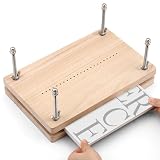
- Book Press Bookbinding: Measuring book press 11.8 x 7.6 inches and 0.67 inches thick, the book binding press is sturdy and durable, made of high-quality wood. Bookbinding press is an ideal choice for bookbinding
- Book Binding Supplies Quality: The book binding press is made of high-quality wood and is sturdy and durable. Our book board for book binding with rounded corners and a smooth appearance features a sturdy cross-laminated construction, ensuring durability
- Easy to Install and Use: The book binding materials comes with a detailed instruction manual, which contains a variety of binding techniques suitable for beginners and professionals. The illustrated guide allows you to get started quickly and easily master the basic steps and usage of binding
- Book Binding Press: New punch function, you can easily and accurately punch holes with an awl, making the hole spacing uniform, and avoiding the hole position tilting, which can quickly improve your work efficiency
- Widely applicable: This books makings kit can meet your various needs, including bookbinding, old book repair, cover binding, embossing, Diy handmade books, and photo album making. Whether bookbinding supplies is a personal hobby or office use, book clamp can be easily used. Book press bookbinding is an ideal choice for handmade book lovers
FAQ
How large should my photos be for a coffee table book?
Aim for at least 300 DPI (dots per inch) at the intended print size. This usually means using images from a good quality camera or a modern smartphone, not just any old snapshot.
Can I really design my own coffee table book?
Absolutely. Many online services offer user-friendly design tools. You can also use software like Adobe InDesign or Affinity Publisher for more control, though there’s a steeper learning curve.
What’s the difference between matte and glossy paper?
Glossy paper makes colors pop and images look vibrant, but it can cause glare and show fingerprints easily. Matte paper has a softer finish, reduces glare, and gives a more sophisticated feel, though colors might be slightly less saturated.
How many photos do I need?
There’s no magic number. It depends on the size of your book, the size you print each photo, and how many photos you put on a page. A common approach is 1-3 photos per page for a clean look.
Should I edit all my photos before starting the design?
Yes, it’s highly recommended. Editing ensures consistent lighting, color balance, and sharpness across all your images, which makes for a much more professional-looking book.
What if I don’t have enough photos for a whole book?
You might need to go back and shoot more, or consider a different project. Alternatively, you could focus on a smaller, more curated collection or supplement your photos with other visual elements if appropriate.
How do I choose a good printer?
Look for printers that specialize in photo books. Check online reviews, ask for sample prints if possible, and compare pricing and turnaround times. Don’t just go for the cheapest option.
What is bleed and why is it important?
Bleed is a small margin of image or color that extends beyond the trim line of your page. It ensures that when the book is cut, there are no white edges if the cut isn’t perfectly precise. Always check your printer’s bleed requirements.
What This Page Does Not Cover (and Where to Go Next)
- Advanced graphic design techniques: This guide focuses on the basics. For intricate layouts, explore resources on typography, color theory, and visual hierarchy.
- Specific printing service reviews: We don’t endorse particular companies. Research current options based on your location and budget.
- Copyright and licensing: If you’re using images you didn’t take, understand the legalities.
- Marketing and selling your book: This guide is about creation, not distribution. If you plan to sell, look into self-publishing platforms and marketing strategies.