
Fixing a Keurig Single Cup Coffee Maker
Quick answer
- Most Keurig issues are simple fixes, often related to water flow or cleaning.
- Check your water reservoir is seated correctly and full.
- Ensure the K-Cup pod is properly inserted and the handle is fully closed.
- A clogged needle or descaling needed are common culprits.
- Sometimes, a simple reset can do the trick.
- Always unplug before poking around inside.
What this problem usually is (and is not)
- This guide is for common operational hiccups, not major electrical failures.
- We’re talking about weak coffee, no coffee, or weird noises, not sparks.
- It’s usually not a sign you need a whole new machine.
- We won’t cover deep cleaning of the internal heating element itself, just descaling.
- Safety first. If it smells burnt or looks damaged, unplug it and call it a day.
- This is about getting your morning brew back on track, plain and simple.
Likely causes (triage list)
Water Flow Issues
- Reservoir not seated: Make sure the water tank is pushed down firmly and clicking into place. If it’s loose, water won’t get to the pump.
- Low water level: Obvious, but easy to overlook. Is there enough water for a full brew cycle?
- Air lock in the pump: Sometimes air gets trapped, stopping water flow. This usually happens after refilling the reservoir.
Coffee & Pod Problems
- Clogged K-Cup pod: A pod might be faulty or have too fine a grind, blocking water.
- Pod not punctured: The machine might not have pierced the pod correctly.
- Wrong pod size: While rare, using an incompatible pod can cause issues.
Filter & Basket Blockages
- Clogged exit needle: The needle that pierces the bottom of the pod can get clogged with coffee grounds.
- Clogged entrance needle: The needle that pierces the top can get blocked too.
- Debris in the brew basket: Grounds or other gunk can impede water flow.
Machine Setup & Power
- Incorrect pod placement: The pod needs to sit just right in the holder.
- Handle not fully closed: The lid needs to be fully down to engage the piercing mechanism.
- Power interruption: A brief power flicker can sometimes reset the machine mid-brew.
Scale Buildup
- Mineral deposits: Over time, minerals from your water build up inside, slowing everything down. This is a super common one.
Fix it step-by-step (brew workflow)
1. Check the Reservoir:
- What to do: Remove the water reservoir. Rinse it out. Ensure the valve at the bottom is clear. Re-seat it firmly until it clicks.
- What “good” looks like: The reservoir sits snugly and doesn’t wobble.
- Common mistake: Not pushing the reservoir down hard enough. It needs a solid click.
2. Inspect the K-Cup Holder:
- What to do: Lift the handle. Remove any existing pod. Look inside the holder for coffee grounds or debris.
- What “good” looks like: The holder is clean and free of obstructions.
- Common mistake: Forgetting to remove the old pod before inserting a new one.
3. Clear the Exit Needle:
- What to do: With the handle up, carefully use a straightened paperclip or a specific Keurig cleaning tool to poke up into the hole at the bottom of the K-Cup holder. Rotate gently.
- What “good” looks like: You can feel the needle move freely and dislodge any grounds.
- Common mistake: Forcing the paperclip too hard, potentially bending or breaking the needle.
For clearing stubborn clogs, a specialized Keurig cleaning tool can be more effective than a paperclip. Consider picking up a set of Keurig replacement parts that often include these handy tools.
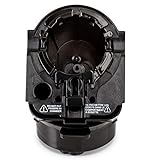
- Designed for all Keurig 2.0 models such as K200, K225, K250, K300, K325, K350, K400, K425, K450, K500, K525, K550, K600, K650, K675. Perfectly compatible with keurig 2.0 model coffee machine.
- Made from high quality materials, 100% BPA free plastic, Helping produce the best brews you ever had!
- Part 1, 2 and 3 for all Keurig 2.0 Models (Full Assembly)
- Remove side sticker and insert full assembly into Brewing Chamber
- We provide a 1-year warranty, Feel free to contact us if there are any problems with the item, we will replace at no charge to you
4. Clear the Entrance Needle:
- What to do: Look at the underside of the handle. You’ll see a pointed needle. Use a paperclip to gently poke into the hole and clear out any grounds.
- What “good” looks like: The needle hole is clear.
- Common mistake: Not realizing there are two needles to clean.
5. Run a Water-Only Brew:
- What to do: With no K-Cup pod in the machine, place a mug under the spout. Select your usual brew size and start.
- What “good” looks like: A steady stream of hot water flows into the mug.
- Common mistake: Putting a pod in and expecting it to work. This step is without a pod.
6. Check for Air Lock:
- What to do: If step 5 yielded little or no water, try removing the reservoir again. Hold the machine upside down over a sink (carefully!) to let any trapped air escape the pump mechanism. Then re-seat the reservoir and try step 5 again.
- What “good” looks like: Water now flows freely when running water only.
- Common mistake: Not being gentle when tilting the machine.
7. Insert a New K-Cup Pod:
- What to do: Place a fresh K-Cup pod into the holder. Make sure it’s sitting flat.
- What “good” looks like: The pod sits snugly and evenly.
- Common mistake: Inserting the pod at an angle.
8. Close the Handle Firmly:
- What to do: Lower the handle until it clicks and locks securely. You should hear the pod being pierced.
- What “good” looks like: The handle is fully down, and you hear the distinct “pop” of the pod being punctured.
- Common mistake: Not pushing the handle all the way down, leading to incomplete piercing or leaks.
9. Brew Your Coffee:
- What to do: Select your desired brew size and press the brew button.
- What “good” looks like: Hot coffee fills your mug at a normal pace.
- Common mistake: Rushing the process and not waiting for the machine to heat up fully.
10. Descale if Necessary:
- What to do: If the flow is still weak or inconsistent after the above steps, it’s time to descale. Follow your Keurig’s descaling instructions using a descaling solution or vinegar/water mix. This usually involves running several cycles of the solution, then rinsing cycles.
- What “good” looks like: The machine brews strongly and consistently after descaling.
- Common mistake: Skipping descaling for too long, leading to permanent clogs or damage.
Prevent it next time
- Clean the K-Cup holder weekly. A quick wipe-down prevents grounds buildup.
- Descale every 3-6 months. Depends on your water hardness. Check the manual.
- Use filtered water. It tastes better and causes less scale.
- Store water properly. If you don’t use water daily, keep the reservoir clean and covered.
- Ensure the reservoir is seated correctly. Always give it a firm push.
- Don’t force the handle. It should close smoothly.
- Check needles regularly. A quick poke with a paperclip can save headaches.
- Use quality K-Cup pods. Avoid pods that look like they have super-fine grounds.
- Unplug when cleaning. Basic safety, always.
- Run water-only cycles occasionally. Helps flush out the system.
Common mistakes (and what happens if you ignore them)
| Mistake | What it causes | Fix |
|---|---|---|
| Not seating reservoir firmly | No water pumped, brew fails | Remove and re-seat reservoir until it clicks. |
| Forcing the handle down | Damaged lid, needle, or K-Cup holder | Close handle gently; ensure pod is seated correctly. |
| Ignoring descaling | Slow brew, weak coffee, machine failure | Descale according to manufacturer instructions. |
| Using tap water | Faster scale buildup, off-tasting coffee | Switch to filtered or bottled water. |
| Not cleaning needles | Clogged water flow, incomplete piercing | Use a paperclip to clear exit and entrance needles. |
| Leaving old pod in | Grounds can clog, affect next brew | Always remove the used K-Cup before brewing again. |
| Not running water-only | Air lock persists, weak flow | Remove reservoir, tilt machine over sink to release air, then retry. |
| Overfilling reservoir | Can prevent proper seating, cause leaks | Fill to the MAX line, no higher. |
| Using damaged K-Cups | Leaks, grounds in coffee, brewing issues | Discard damaged pods and use new ones. |
| Not fully closing handle | Pod not pierced, leaks, weak coffee | Push handle down until it clicks. |
Decision rules (simple if/then)
- If the machine makes noise but no water comes out, then check for an air lock because air can get trapped in the pump.
- If coffee is weak or watery, then descale the machine because mineral buildup restricts water flow.
- If the handle is hard to close, then check for a K-Cup pod that isn’t seated properly because it might be blocking the mechanism.
- If there’s no power at all, then check the plug and the outlet because the machine might not be receiving electricity.
- If water leaks from the bottom, then check the reservoir seal and the brew basket because they might be loose or damaged.
- If the coffee tastes burnt or bitter, then clean the K-Cup holder and needles because old grounds can affect flavor.
- If the machine is making unusual grinding noises, then check the K-Cup pod for damage or improper insertion because it might be catching on something.
- If the brew cycle stops mid-way, then check the water level and reservoir seating because it might have lost its connection or run dry.
- If only a small amount of water comes out, then clear the exit needle because it’s likely clogged with coffee grounds.
- If the machine powers on but doesn’t brew, then try running a water-only cycle to isolate the issue to the K-Cup or piercing mechanism.
- If you see grounds in your coffee, then check the K-Cup pod for tears and ensure it’s seated correctly because a damaged pod or poor fit will let grounds escape.
FAQ
Q: My Keurig won’t turn on. What’s up?
A: First, check that it’s plugged in securely and the outlet is working. If it is, try a different outlet. Sometimes a simple power cycle (unplugging for a minute) can reset it.
Q: Why is my coffee brewing so slowly?
A: This is usually a sign of scale buildup inside the machine. Descaling is your best bet. Also, make sure your K-Cup pod isn’t packed too tightly or damaged.
Q: I see grounds in my coffee. How do I stop that?
A: Check the K-Cup pod for tears or damage. Ensure it’s seated correctly in the holder and the handle is fully closed. Sometimes, a cleaning of the exit needle can help if grounds are getting stuck there.
Q: My Keurig is making weird noises. What should I do?
A: Strange noises can mean a few things. It could be an air lock (try the upside-down trick), scale buildup (descale it), or a pod that isn’t seated right. Listen closely to pinpoint where the noise is coming from.
Q: Can I use vinegar to descale my Keurig?
A: Yes, many Keurig models can be descaled with a mixture of white vinegar and water. However, always check your specific model’s manual, as some manufacturers recommend their own descaling solution for best results and to avoid voiding warranties.
Q: How often should I descale my Keurig?
A: It depends on your water hardness. A good rule of thumb is every 3 to 6 months. If you notice slower brewing or less hot coffee, it’s definitely time.
Q: My K-Cup holder is stuck. What now?
A: Don’t force it. Make sure there isn’t a pod stuck inside. Gently try to wiggle it. If it’s still stuck, unplug the machine and check for debris around the holder mechanism.
Q: Can I brew without a K-Cup pod?
A: Yes, most Keurigs allow you to run a water-only cycle. This is great for rinsing the system or just getting hot water for tea or other uses.
What this page does NOT cover (and where to go next)
- Troubleshooting electrical shorts or internal component failure. If your machine sparks or smells like burning plastic, unplug it immediately and contact the manufacturer.
- Repairing broken plastic parts on the exterior or brew head. These usually require part replacement.
- Advanced modifications or hacks to the machine’s circuitry. Stick to official methods.
- Specific error codes for every Keurig model. Consult your user manual for detailed error code explanations.
- Cleaning the internal heating element itself. Descaling handles mineral buildup on the pathways.
- Replacing the pump or other internal mechanical parts. This is generally beyond a simple DIY fix.