
Locating the Filter on Your Keurig 2.0 Coffee Maker
Quick answer
- Keurig 2.0 models typically have two types of filters: a water filter and a reusable coffee filter.
- The water filter is usually located inside the water reservoir.
- The reusable coffee filter, if your model has one, sits in the brew head where you’d normally place a K-Cup.
- Check the water reservoir for a plastic housing, often with a pull tab, for the water filter.
- If you have a reusable filter, it will be a mesh basket that fits into the K-Cup holder.
- Always unplug your Keurig before attempting to remove or replace any filter.
Who this is for
- Keurig 2.0 owners who are new to their machine and need to find the filters.
- Anyone experiencing brewing issues and suspects a filter problem.
- Folks looking to switch to reusable filters or maintain their existing ones.
What to check first
Brewer type and filter type
Your Keurig 2.0 is designed for single-serve brewing, usually with K-Cups. Some models also support reusable filters for ground coffee. Knowing which you have is key. If you’re unsure, check the model number on the bottom or back of your machine. The manual is your friend here, or a quick online search with your model number.
Water quality and temperature
The water filter helps remove impurities that affect taste. If your coffee tastes off, even with fresh beans, the water filter might be the culprit. Water temperature is also crucial for extraction. Your Keurig handles this automatically, but if it seems to be brewing too cool or too hot, it could indicate a machine issue, not necessarily a filter problem.
Grind size and coffee freshness
If you’re using a reusable filter, grind size matters. Too fine, and it clogs. Too coarse, and you get weak coffee. For K-Cups, this isn’t your concern. Always use freshly roasted beans for the best flavor. Stale coffee just won’t taste good, no matter what filter you use.
Coffee-to-water ratio
This is mainly for reusable filter users. A good starting point is about 1-2 tablespoons of coffee grounds per 6 oz of water. Experiment to find your sweet spot. Too much coffee can lead to over-extraction and bitterness. Too little, and it’ll be weak.
Cleanliness/descale status
A dirty machine or a clogged water filter will impact your brew. If your Keurig needs descaling, it can affect flow and temperature. Regularly cleaning the brew head and descaling the machine is as important as the filters themselves for good coffee.
Step-by-step (brew workflow)
1. Identify your filter needs
What to do: Determine if you need to check or replace the water filter or if you’re using a reusable coffee filter.
What “good” looks like: You know whether you’re dealing with the water reservoir or the brew head.
Common mistake: Assuming all Keurigs only have one type of filter.
How to avoid: Check your machine’s accessories or the manual for clarity.
2. Locate the water filter
What to do: Open the water reservoir lid. Look inside for a plastic housing.
What “good” looks like: You see a filter cartridge, usually white or blue, nestled in the reservoir. It might have a pull tab.
Common mistake: Not realizing the water filter is inside the reservoir.
How to avoid: Give the reservoir a good look-around before assuming there’s no filter.
When you locate the water filter housing, you’ll need a replacement Keurig 2.0 water filter to ensure optimal taste and machine health.
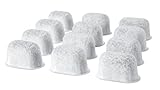
- MAJOR CONTENTS:12-Pack Replacement Charcoal Water Filter Cartridges fit Keurig Single Brewing System.
- COMPATIBLE MODELS: Keurig coffee machine purchased after August 2007: Keurig 1.0 Elite,Classic, Ultra, Special Edition, Ultimate and Platinum series, Keurig 2.0 K200, K300, K400, K500 series.
- PACKING ADVANTAGE: Each water filter refill is individually sealed to avoid exposure to air, one year supply to pre-store and exchange easily and regularly.
- PREMIUM FILTRATION: Keurig charcoal water filters reduce impurities, calcium, chlorine and odors, creating the best-tasting coffee.
- FOR BETTER TASTING BEVERAGES: Replace the Keurig water filter every 2 months or every 60 water tank refills, replace it more often, if you have hard water in your area.
3. Remove the water filter (if necessary)
What to do: Gently pull the filter housing upwards. Some might have a release tab.
What “good” looks like: The filter cartridge comes out easily without forcing.
Common mistake: Yanking too hard and breaking the housing.
How to avoid: Be gentle and look for any specific release mechanisms mentioned in your manual.
4. Prepare the new water filter
What to do: Follow the instructions that came with your new water filter. This often involves soaking it in water for a few minutes.
What “good” looks like: The filter is ready to be installed, usually after a quick rinse or soak.
Common mistake: Installing a new filter without preparing it as instructed.
How to avoid: Always read the filter’s packaging or manual for specific prep steps.
5. Install the new water filter
What to do: Place the prepared filter back into its housing in the reservoir. Ensure it’s seated securely.
What “good” looks like: The filter clicks or sits firmly in place.
Common mistake: Not pushing the filter all the way in.
How to avoid: Give it a gentle push down to make sure it’s properly seated.
6. Locate the reusable coffee filter (if applicable)
What to do: Open the brew head where you would normally insert a K-Cup.
What “good” looks like: You see the K-Cup holder, and if you have one, a mesh filter basket that fits inside it.
Common mistake: Confusing the K-Cup holder with the filter itself.
How to avoid: The reusable filter is a separate basket designed to hold coffee grounds.
7. Prepare the reusable coffee filter
What to do: Fill the reusable filter basket with your desired amount of coffee grounds.
What “good” looks like: The basket is filled evenly, not packed too tightly.
Common mistake: Overfilling the filter, which can cause grounds to escape.
How to avoid: Leave a little space at the top for the water to flow through.
8. Insert the reusable coffee filter
What to do: Place the filled reusable filter basket into the K-Cup holder in the brew head.
What “good” looks like: The filter sits snugly in place, ready for brewing.
Common mistake: Not seating the filter properly, leading to leaks or poor extraction.
How to avoid: Make sure it’s fully inserted and aligned correctly.
9. Brew your coffee
What to do: Close the brew head, select your brew size, and start the brewing cycle.
What “good” looks like: Coffee flows smoothly into your mug.
Common mistake: Forgetting to close the brew head completely.
How to avoid: Always ensure the lid is shut firmly before pressing brew.
10. Clean up
What to do: Discard used coffee grounds from the reusable filter and rinse it, or just remove the K-Cup.
What “good” looks like: Your machine is clean and ready for the next use.
Common mistake: Leaving grounds in the reusable filter, which can lead to mold.
How to avoid: Rinse the reusable filter immediately after each use.
Common mistakes (and what happens if you ignore them)
| Mistake | What it causes | Fix |
|---|---|---|
| Not replacing the water filter | Stale, off-tasting coffee; mineral buildup in machine | Replace water filter every 2 months or as recommended. |
| Using the wrong grind size (reusable filter) | Weak coffee (too coarse) or bitter/clogged (too fine) | Use a medium grind, similar to coarse sand. |
| Overfilling reusable filter | Grounds in coffee, messy brew head | Leave about 1/4 inch of space at the top of the filter basket. |
| Not rinsing reusable filter immediately | Mold, mildew, stale coffee taste | Rinse the filter thoroughly with hot water after every use. |
| Forgetting to prepare new water filter | Ineffective filtering, potential for loose particles | Follow manufacturer’s instructions for soaking/rinsing new filters. |
| Not seating reusable filter correctly | Leaks, grounds in coffee, incomplete brew | Ensure the filter basket is fully and firmly in the K-Cup holder. |
| Ignoring descaling prompts | Slow brewing, poor taste, machine damage | Descale your Keurig regularly according to the manual. |
| Using stale coffee beans | Flat, dull coffee flavor | Use freshly roasted beans and store them properly. |
| Forcing a filter out or in | Damaged filter housing or machine parts | Be gentle; check the manual if a part is stuck. |
Decision rules (simple if/then)
- If your coffee tastes bland or papery, then check your water filter because it might be expired or clogged.
- If you see grounds in your coffee when using a reusable filter, then your grind is likely too fine or you overfilled the basket because water can’t flow through properly.
- If your Keurig is brewing slowly, then it’s probably time to descale because mineral buildup is restricting water flow.
- If you’re using a reusable filter and the coffee is weak, then you need to use a finer grind or more coffee because the water is passing through too quickly.
- If your new water filter doesn’t seem to be working, then double-check that you followed the preparation steps (like soaking) because some require it before use.
- If your Keurig 2.0 is making strange noises, then check the water reservoir to ensure it’s filled correctly and the filter is seated properly because an air pocket can cause issues.
- If you want to save money and reduce waste, then consider using a reusable coffee filter because it’s a one-time purchase that lasts.
- If your reusable filter seems difficult to clean, then use a soft brush to gently scrub away coffee residue because harsh scrubbing can damage the mesh.
- If you’re unsure about your specific Keurig 2.0 model’s filter type or maintenance, then consult your owner’s manual because it has the most accurate information.
- If your coffee tastes bitter, then check your coffee-to-water ratio and grind size if using a reusable filter, or consider a different K-Cup blend because over-extraction can cause bitterness.
FAQ
Where is the water filter located on a Keurig 2.0?
The water filter is typically found inside the water reservoir. You’ll usually see a plastic housing unit where the filter cartridge sits.
How often should I change the water filter?
Most manufacturers recommend changing the water filter every two months, or after about 40 gallons of water. Check your filter’s packaging for specific guidance.
Can I use a reusable filter with any Keurig 2.0?
Many Keurig 2.0 models are compatible with reusable coffee filters, often called “My K-Cup” or similar. Check your machine’s specifications or the filter’s product details.
What happens if I don’t replace the water filter?
An old water filter can lead to diminished coffee flavor due to impurities in the water, and can also contribute to mineral buildup inside your Keurig.
How do I know if my Keurig 2.0 needs a filter change?
Besides the recommended schedule, you might notice a change in your coffee’s taste or a slight decrease in brewing speed. Some machines may also have an indicator light.
What kind of coffee grounds should I use with a reusable filter?
A medium grind is generally recommended for reusable filters. It’s similar to the texture of coarse sand. Too fine can clog, too coarse can lead to weak coffee.
Is it safe to use a reusable filter?
Yes, reusable filters are safe when used and cleaned properly. They are designed to withstand the brewing process.
What if my reusable filter doesn’t fit?
Ensure you have the correct type of reusable filter for your specific Keurig 2.0 model. If it still doesn’t fit, check for any obstructions or damage to the K-Cup holder.
What this page does NOT cover (and where to go next)
- Specific troubleshooting for error codes displayed on your Keurig 2.0.
- Detailed instructions on how to repair a broken Keurig machine.
- Advanced brewing techniques for espresso or cold brew with your Keurig.
- Comparisons of different K-Cup brands or reusable filter materials.
- Information on older or newer Keurig models outside the 2.0 series.
