
Is Your Coffee Maker Too Loud? Understanding the Noise
Quick answer
- Unusual or excessive noise from your coffee maker often indicates a solvable problem.
- Most common causes include mineral buildup, improper water levels, or a clogged filter basket.
- Regular cleaning, especially descaling, is crucial for quiet operation.
- Some noise is normal; listen for changes from typical brewing sounds.
- Address noise promptly to prevent potential damage or poor coffee quality.
What this problem usually is (and is not)
- This problem is usually related to water flow, mineral deposits, or vibrating components.
- It is often a sign that your machine needs cleaning or a minor adjustment.
- It is not typically a sign of immediate electrical failure, though persistent issues can lead to component strain.
- It is not usually a complex internal mechanical breakdown that requires specialized tools for diagnosis.
- It is not normal for a coffee maker to suddenly become significantly louder than its usual operating sounds.
- It is not a problem that will typically resolve itself; it usually requires user intervention.
Likely causes of a loud coffee maker (triage list)
- Mineral Buildup (Scale): Hard water minerals can accumulate in the heating element and water lines, restricting flow and causing strain.
- How to confirm: Look for white, chalky deposits in the water reservoir or on the heating plate.
- Low Water Level: If the reservoir is too low, the pump may struggle to draw water, leading to gurgling or straining noises.
- How to confirm: Check the water level before brewing; if it’s at or below the minimum line, this could be the cause.
- Clogged Filter Basket or Brew Head: Coffee grounds or fine sediment can block the flow of water, causing pressure to build up and resulting in loud gurgling or sputtering.
- How to confirm: Inspect the filter basket and the showerhead (where water dispenses) for visible blockages.
- Improperly Seated Components: The water reservoir, filter basket, or carafe may not be correctly aligned, causing vibrations or air to be drawn in.
- How to confirm: Gently push down or reseat all removable parts before brewing.
- Air in the Water Lines: After refilling or if the machine has been stored, air can get trapped, causing sputtering and gurgling as the pump tries to move it.
- How to confirm: This often occurs after the first brew cycle following a refill or long period of disuse.
- Old or Worn Pump: Over time, the internal pump can become less efficient or develop issues, leading to louder operation.
- How to confirm: If all other causes are ruled out and the machine is several years old, a worn pump might be the culprit. This usually presents as a consistent, louder-than-normal hum or buzz.
If the reservoir is too low, the pump may struggle to draw water, leading to gurgling or straining noises. Ensuring your coffee maker water reservoir is adequately filled is key to quiet operation.
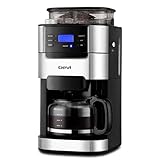
Gevi Coffee Grinder Electric,Coffee Bean Grinder with 35 Grind Settings for Espresso,Drip,French Press,Burr Coffee Grinder for Home Use,Anti-static Design,Black
- 【𝟐-𝟏𝟎 𝐂𝐮𝐩 𝐅𝐥𝐞𝐱𝐢𝐛𝐥𝐞 𝐂𝐚𝐩𝐚𝐜𝐢𝐭𝐲】Our drip coffee maker with built-in grinder lets you brew anywhere from 2 to 10 cups. Simply use the “POWDER 2-10” button to adjust the ratio of coffee to water for your perfect strength.
- 【𝐂𝐮𝐬𝐭𝐨𝐦𝐢𝐳𝐚𝐛𝐥𝐞 𝐁𝐫𝐞𝐰 & 𝐆𝐫𝐢𝐧𝐝】This all-in-one machine with a burr grinder offers 3 grind strength levels and 8 adjustable settings. Grind fresh whole beans right before brewing for consistently smooth, flavorful coffee.
- 【𝐑𝐞𝐮𝐬𝐚𝐛𝐥𝐞 & 𝐄𝐚𝐬𝐲-𝐂𝐥𝐞𝐚𝐧 𝐅𝐢𝐥𝐭𝐞𝐫】The coffee maker includes a durable reusable filter that is easy to clean—just rinse with water for quick maintenance and less waste.
- 【𝐈𝐦𝐩𝐨𝐫𝐭𝐚𝐧𝐭 𝐍𝐨𝐭𝐞】Product dimensions: 12.36″D x 8.38″W x 16.93″H. Please measure your countertop and cabinet space beforehand to ensure proper fit.
- 【𝐏𝐫𝐞-𝐁𝐫𝐞𝐰 𝐄𝐱𝐭𝐫𝐚𝐜𝐭𝐢𝐨𝐧 𝐓𝐞𝐜𝐡𝐧𝐨𝐥𝐨𝐠𝐲】Featuring advanced pre-brew technology, this black & silver coffee maker evenly saturates coffee grounds through precise temperature control, unlocking richer flavor and aroma before full brewing.
Fix it step-by-step (brew workflow)
1. Check Water Level and Reservoir Seating: Ensure the water reservoir is filled to an appropriate level (not too low) and is firmly seated in its position.
- What good looks like: Water level between MIN and MAX lines, reservoir clicks securely into place.
- Common mistake & avoidance: Overfilling can cause spills; underfilling strains the pump. Fill to the desired amount for your brew.
2. Inspect and Clear the Filter Basket: Remove the filter basket and clean it thoroughly, ensuring all holes are clear of coffee grounds or debris.
- What good looks like: Basket is clean, no visible blockages, water flows freely through the holes when rinsed.
- Common mistake & avoidance: Leaving old grounds can cause blockages. Rinse the basket after every use.
3. Clean the Brew Head/Showerhead: Use a small brush or a damp cloth to wipe down the brew head (where water dispenses onto the grounds), ensuring no coffee oils or grounds are obstructing the flow.
- What good looks like: Showerhead holes are clear and free of residue.
- Common mistake & avoidance: Forgetting this area allows buildup. Make it part of your daily wipe-down.
4. Descale Your Coffee Maker: Perform a descaling cycle using a commercial descaling solution or a 1:1 mixture of white vinegar and water. Follow your manufacturer’s instructions carefully.
- What good looks like: Machine operates with less gurgling and sputtering, and water flows more smoothly.
- Common mistake & avoidance: Not rinsing thoroughly after descaling can leave a vinegar taste. Run 2-3 cycles with plain water afterward.
5. Check Carafe and Hot Plate Alignment: Ensure the carafe is correctly placed on the hot plate, activating the drip-stop mechanism fully (if applicable).
- What good looks like: Carafe sits flat and securely, no wobbling.
- Common mistake & avoidance: Misaligning the carafe can cause coffee to back up and overflow. Always check its position.
6. Verify Grind Size: If using freshly ground coffee, ensure the grind size is appropriate for your machine (medium for most drip makers). Too fine a grind can restrict water flow.
- What good looks like: Coffee grounds resemble coarse sand, not a fine powder.
- Common mistake & avoidance: Using espresso-fine grounds in a drip machine can lead to clogs and over-extraction. Adjust your grinder if needed.
7. Run a Plain Water Cycle: After cleaning or if you suspect air in the lines, run one or two cycles with only plain water (no coffee).
- What good looks like: Water flows smoothly, and the machine sounds return to normal or a quieter hum.
- Common mistake & avoidance: Skipping this step after descaling can leave residual cleaning solution.
8. Listen for Specific Noises: Pay attention to when the noise occurs (startup, mid-brew, end) and what type of noise it is (gurgling, sputtering, vibrating hum) to help pinpoint the source.
- What good looks like: You can describe the noise accurately, helping diagnose the issue or explain it to support.
- Common mistake & avoidance: Ignoring intermittent noises can lead to bigger problems. Address them when they start.
Prevent why your coffee maker is so loud next time
- Regular Descaling: Descale your machine every 1-3 months, depending on water hardness and usage.
- Daily Cleaning: Rinse the filter basket, carafe, and wipe down the brew head after each use.
- Use Filtered Water: Reduce mineral buildup by using filtered or purified water instead of hard tap water.
- Proper Water Storage: Don’t leave water sitting in the reservoir for extended periods; empty and refill fresh for each brew.
- Correct Grind Size: Use a medium grind for most drip coffee makers to prevent clogs and ensure proper flow.
- Appropriate Coffee-to-Water Ratio: Avoid overpacking the filter basket, which can restrict water flow.
- Check All Components: Ensure the reservoir, filter basket, and carafe are always correctly seated before brewing.
- Monitor for Changes: Pay attention to any new or increasing noises and address them promptly.
Common mistakes (and what happens if you ignore them)
| Mistake | What it causes | Fix |
|---|---|---|
| Not descaling regularly | Mineral buildup, restricted water flow, loud gurgling, longer brew times, eventually machine failure. | Descale every 1-3 months with vinegar or descaling solution. |
| Using hard tap water | Rapid mineral buildup, dull-tasting coffee, increased noise. | Use filtered water or bottled spring water. |
| Neglecting to clean the brew head | Clogged holes, uneven water distribution, sputtering, weak or unevenly extracted coffee. | Wipe down and clear brew head holes after each use. |
| Using too fine a coffee grind | Clogged filter, slow brewing, over-extraction, bitter coffee, machine strain. | Use a medium grind for drip coffee makers. |
| Leaving water in the reservoir | Stale water, potential for mold/algae growth, unpleasant odors, mineral deposits. | Empty and refill the reservoir with fresh water for each brew. |
| Not seating the carafe correctly | Coffee overflow, messy spills, potential for hot plate damage. | Always ensure the carafe is fully seated before brewing. |
| Overfilling the filter basket | Grounds overflow, weak coffee, potential for clogs. | Use the recommended coffee-to-water ratio; do not exceed the max fill line. |
| Ignoring new or louder noises | Minor issues can escalate to pump failure or electrical problems, requiring costly repairs or replacement. | Troubleshoot promptly using the steps outlined above. |
| Not rinsing after descaling | Residual descaling solution can impart an unpleasant taste to your coffee. | Run 2-3 cycles with plain water after descaling. |
Decision rules (simple if/then)
- If your coffee maker is making a loud gurgling sound during brewing, then check the water level and descale it because mineral buildup or low water can restrict flow.
- If the noise is a sputtering sound and coffee is brewing slowly, then inspect the filter basket and brew head for clogs because coffee grounds or oils can impede water flow.
- If the machine makes a loud vibrating noise, then ensure all removable components like the reservoir and carafe are properly seated because loose parts can cause vibrations.
- If the noise started after refilling the reservoir or a period of disuse, then run a plain water cycle because air might be trapped in the water lines.
- If the coffee tastes weak or is brewing too fast, then check your grind size because too coarse a grind can cause rapid, noisy extraction.
- If you see white, chalky deposits, then descale immediately because these are mineral deposits causing strain on the pump.
- If the machine is old and consistently louder than usual despite cleaning, then consider professional service or replacement because the pump may be wearing out.
- If the noise is accompanied by coffee overflowing the filter, then you likely used too much coffee or too fine a grind because this causes blockages.
- If the noise is a consistent, high-pitched hum that changes pitch during brewing, then it’s likely the pump working, which is normal, but check for blockages if it’s unusually loud.
FAQ
Q: Is some noise normal for a coffee maker?
A: Yes, all coffee makers make some noise, typically a hum from the heating element and pump, and gurgling as water moves. The concern arises when the noise becomes significantly louder, changes in character, or is accompanied by other performance issues.
Q: How often should I descale my coffee maker to prevent noise?
A: The frequency depends on your water hardness and usage. For most users with average tap water, descaling every 1-3 months is recommended. If you use filtered water, you might extend this to 4-6 months.
Q: Can using filtered water help reduce noise?
A: Absolutely. Filtered water significantly reduces the mineral content entering your machine, thereby slowing down the rate of scale buildup, which is a primary cause of excessive noise.
Q: My coffee maker is making a loud grinding noise. What could it be?
A: Drip coffee makers typically don’t have grinding components. If you hear a grinding noise, it’s more likely a severe gurgle or a strained pump. Check for severe mineral buildup or a significant blockage. If it’s a machine with an integrated grinder, the grinder itself might need cleaning or adjustment.
Q: Will a noisy coffee maker eventually break down?
A: Not always immediately, but persistent excessive noise often indicates your machine is working harder than it should. Ignoring these warnings can lead to increased wear and tear on internal components, potentially shortening its lifespan or leading to a more costly repair.
Q: What if my coffee maker is still loud after cleaning and descaling?
A: If all cleaning and troubleshooting steps fail, the issue might be an internal component, such as a worn-out pump. At this point, it may be best to consult the manufacturer’s support or consider replacing the unit, especially if it’s an older machine.
See also: Keeping Your Nuvera Coffee Maker Clean For Optimal Performance.
See also: Troubleshooting Eo Error On Your Cuisinart Coffee Maker.
See also: Troubleshooting Your Coffee Maker Isnt Working.
What this page does NOT cover (and where to go next)
- Specific repair instructions for internal components or pump replacement.
- Troubleshooting for espresso machines, which have different pressure systems and noise profiles.
- Detailed comparisons of quiet coffee maker models.
- Advice on specific brand warranties or service centers.
- Advanced electrical diagnostics or component testing.