
Cleaning Your New Bunn Coffee Maker: What You Need to Know
Quick answer
- Yes, you should clean your new Bunn coffee maker, even when it’s new.
- Initial cleaning removes manufacturing residues and ensures the best flavor.
- A quick rinse of removable parts is usually sufficient before the first brew.
- For deeper cleaning, follow the manufacturer’s recommended descaling process.
- Regular cleaning prevents mineral buildup and maintains optimal performance.
- Consistent cleaning is key to enjoying fresh-tasting coffee from your Bunn maker.
Who this is for
- New Bunn coffee maker owners who want to ensure the best possible first cup.
- Home brewers concerned about coffee taste and machine longevity.
- Anyone looking for guidance on initial setup and ongoing maintenance for their Bunn brewer.
What to check first
Brewer type and filter type
Before brewing, confirm the type of Bunn coffee maker you have (e.g., pour-over, automatic drip) and the specific filter it uses (paper, permanent metal, or none). This dictates how you’ll handle cleaning and brewing. For instance, a permanent filter will require daily rinsing, while paper filters are single-use. Always check your brewer’s manual for the exact filter requirements.
Water quality and temperature
The quality of your water significantly impacts coffee flavor and the speed at which mineral buildup occurs. If your tap water is hard, consider using filtered water for brewing. Bunn coffee makers are designed to heat water to an optimal brewing temperature, typically between 195°F and 205°F, which is crucial for proper coffee extraction. You can usually verify this by observing the brewing cycle; the water should be visibly steaming.
Grind size and coffee freshness
For most Bunn drip coffee makers, a medium grind is recommended. Too fine a grind can lead to over-extraction and bitterness, while too coarse a grind can result in weak, sour coffee. Always use freshly roasted and ground coffee beans. Pre-ground coffee loses its flavor rapidly. Grind your beans just before brewing for the freshest taste.
Coffee-to-water ratio
The standard ratio for drip coffee is often cited as 1:15 to 1:18 (coffee to water by weight). For example, using 2 tablespoons of coffee for every 6 oz of water is a common starting point. Experiment to find what suits your taste. Too much coffee can make it taste too strong or bitter, while too little will result in a weak brew.
Cleanliness/descale status
Even with a new machine, it’s good practice to ensure all removable parts are clean before the very first use. This removes any dust or residue from manufacturing or packaging. For ongoing maintenance, Bunn coffee makers, like all coffee machines, will eventually require descaling. While a new machine won’t need immediate descaling, understanding the process now will help you maintain it later. You can check the manual for the recommended descaling frequency, which depends on your water hardness.
Step-by-step (brew workflow)
1. Assemble Brewer: Place the brew basket into its designated spot.
- What “good” looks like: The brew basket sits securely and evenly.
- Common mistake: Forcing the basket into place. This can damage the brewer.
- How to avoid: Gently guide the basket into position until it clicks or sits flush.
2. Insert Filter: Place the correct type of filter (paper or permanent) into the brew basket.
- What “good” looks like: The filter is seated properly, with no large gaps or folds. For paper filters, ensure it’s fully open and fits snugly against the basket walls.
- Common mistake: Using the wrong size or type of filter, or not opening paper filters properly.
- How to avoid: Consult your Bunn manual for filter specifications. For paper filters, fold the seams if applicable and ensure it’s centered.
3. Add Coffee Grounds: Measure your desired amount of coffee grounds and add them to the filter.
- What “good” looks like: The grounds are evenly distributed in the filter.
- Common mistake: Tamping down the grounds or creating a “well” in the center. This can lead to uneven extraction.
- How to avoid: Gently shake the basket to level the grounds, or lightly tap the sides.
4. Add Water: Fill the water reservoir with fresh, cold water to the desired level.
- What “good” looks like: The water level is accurate according to the markings on the reservoir and your intended brew volume.
- Common mistake: Overfilling or underfilling the reservoir, or using hot water.
- How to avoid: Use cold, filtered water and observe the fill lines carefully.
5. Position Carafe: Place the empty carafe on the warming plate directly beneath the brew basket.
- What “good” looks like: The carafe is centered and positioned correctly to catch the brewed coffee.
- Common mistake: Not placing the carafe properly, or using a carafe that is not designed for your specific Bunn model.
- How to avoid: Ensure the carafe is fully seated and aligned with the brew basket’s drip spout.
6. Start Brew Cycle: Turn on the coffee maker or press the brew button.
- What “good” looks like: The machine begins to heat water and drip coffee into the carafe. You should hear water heating and see coffee flowing.
- Common mistake: Forgetting to turn it on, or pressing the wrong button if your model has multiple functions.
- How to avoid: Double-check that the power switch is in the “on” position and that you’ve selected the correct brewing mode.
7. Monitor Brewing: Observe the brewing process as water heats and coffee drips.
- What “good” looks like: A steady, consistent drip of coffee into the carafe. The water should be hot, and steam may be visible.
- Common mistake: Interrupting the brew cycle unnecessarily, or noticing a very slow or uneven drip.
- How to avoid: Let the brew cycle complete without interference. If the drip is uneven, check your grind size and coffee-to-water ratio.
8. Brew Completion: Wait for the brewing cycle to finish completely.
- What “good” looks like: Dripping stops, and the coffee maker may emit a signal or light to indicate completion.
- Common mistake: Removing the carafe too early, which can cause overflow.
- How to avoid: Allow the machine to finish its cycle entirely before removing the carafe.
9. Serve Coffee: Carefully remove the carafe from the warming plate and pour.
- What “good” looks like: Hot, aromatic coffee ready to be enjoyed.
- Common mistake: Spilling hot coffee due to a misplaced carafe or rushing.
- How to avoid: Use the carafe handle and pour steadily. Be mindful of the hot warming plate.
10. Discard Grounds: Once cooled slightly, remove the brew basket and discard the used coffee grounds and filter.
- What “good” looks like: The used grounds are easily removed without making a mess.
- Common mistake: Trying to remove a hot brew basket or carafe.
- How to avoid: Wait a few minutes for the components to cool before handling.
11. Rinse Parts: Rinse the brew basket and carafe with warm water.
- What “good” looks like: All coffee residue is washed away.
- Common mistake: Leaving coffee oils and residue to dry, which can lead to stale flavors and buildup.
- How to avoid: Rinse immediately after use. For more thorough cleaning, use mild dish soap periodically.
For a thorough clean and to ensure you have the right Bunn coffee maker parts, consider getting a dedicated cleaning kit.
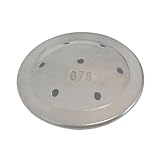
- High quality construction: Made from industrial grade stainless steel, providing a durable, rust-resistant spray head for a superior coffee brewing experience. Replace our original plastic spray head with our stainless steel version for a longer-lasting, quality coffee experience.
- Direct replacement: This is designed to fit seamlessley with GR (GRX), BX, and BT (BTN) series coffee makers.
- High flow functionality: Features 7 spray holes for maximum brewing efficiency while preventing filter overflows.
- Easy to Clean: Its distinctive silver finish aids in quickly locating it in coffee grounds if dislodged from the machine, promoting cleanliness and a hygienic brewing process.
- OCS Parts Assured Quality: At OCS parts, our products undergo meticulous examination to ensure unmatched performance and reliability. Trust OCS Parts for genuine, direct sourcing, and secure packaging, delivering a product that meets the highest standards of quality and customer satisfaction.
Common mistakes (and what happens if you ignore them)
| Mistake | What it causes | Fix |
|---|---|---|
| Not cleaning the machine regularly | Stale coffee, bitter taste, mineral buildup, reduced brewing temperature. | Follow a descaling schedule and rinse parts daily. |
| Using tap water with high mineral content | Scale buildup, affecting heating element and water flow, impacting taste. | Use filtered water or a water softener. |
| Using pre-ground coffee | Loss of volatile aromatics, resulting in flat, stale-tasting coffee. | Grind coffee beans just before brewing. |
| Incorrect grind size (too fine/coarse) | Over-extraction (bitter) or under-extraction (sour, weak) coffee. | Use a medium grind for most Bunn drip makers; check manual for specific recommendations. |
| Not rinsing the carafe and brew basket | Coffee oils build up, leading to rancid flavors and potential mold growth. | Rinse all removable parts with warm water after each use. |
| Using the wrong type or size of filter | Water bypass, poor coffee extraction, grounds in the coffee, potential overflow. | Always use the filter type and size recommended in your Bunn coffee maker’s manual. |
| Overfilling the water reservoir | Potential for overflow during brewing, creating a mess and uneven brew. | Adhere to the water level markings on the reservoir. |
| Rushing the brew cycle or removing carafe early | Coffee overflow, mess, and incomplete extraction, leading to weak coffee. | Allow the brew cycle to complete fully before removing the carafe. |
| Not descaling when needed | Slow brewing, inconsistent temperatures, machine malfunction, poor coffee taste. | Follow the manufacturer’s recommended descaling frequency, typically every 1-3 months. |
| Using cleaning solutions not meant for coffee makers | Can leave chemical residues affecting taste or damage machine components. | Use only Bunn-approved descalers or a vinegar/water solution as per manual instructions. |
Decision rules (simple if/then)
- If your coffee tastes bitter, then reduce the coffee-to-water ratio or check if the grind is too fine, because these can lead to over-extraction.
- If your coffee tastes weak or sour, then increase the coffee-to-water ratio or check if the grind is too coarse, because these can lead to under-extraction.
- If you notice a white, chalky buildup inside the reservoir or on heating elements, then it’s time to descale, because mineral deposits are affecting performance.
- If water is not heating to the proper temperature, then check the descaling status, as mineral buildup can insulate the heating element.
- If you are using a new Bunn coffee maker for the first time, then rinse all removable parts with water, because this removes manufacturing residues.
- If your coffee maker is brewing very slowly, then check for clogs in the brew basket or a need for descaling, because restricted water flow impacts brew time.
- If your coffee has an off-flavor or smells stale, then ensure you are using fresh coffee and cleaning all parts thoroughly, because old coffee or residue can impart bad tastes.
- If you are unsure about the correct grind size for your Bunn model, then consult the user manual, because different models may have slightly different recommendations.
- If your coffee maker is making unusual noises during brewing, then check the water level and ensure all parts are seated correctly, as air in the system or misaligned components can cause noise.
- If you are experiencing overflow from the brew basket, then check that you are using the correct filter type and size, and that the coffee grounds are not too fine or packed too tightly.
FAQ
Do I need to clean a brand new Bunn coffee maker before using it?
Yes, it’s recommended to rinse all removable parts, like the brew basket and carafe, with warm water before your very first brew. This helps remove any residual dust or manufacturing agents.
How often should I descale my Bunn coffee maker?
The frequency of descaling depends on your water hardness. For most users, descaling every 1-3 months is a good starting point. Always refer to your specific Bunn model’s manual for precise recommendations.
What kind of water is best for brewing coffee?
Filtered water is generally recommended. If your tap water is very hard, it can lead to faster mineral buildup (scale) in your coffee maker and can also affect the taste of your coffee.
Can I use vinegar to descale my Bunn coffee maker?
Some Bunn models allow for descaling with a vinegar and water solution (typically 50/50). However, always check your owner’s manual first, as some manufacturers advise against it. Bunn often recommends specific descaling solutions.
How do I know if my Bunn coffee maker needs descaling?
Signs include slower brewing times, inconsistent water temperature, unusual noises, or visible mineral buildup. If your coffee starts tasting “off,” descaling is often the solution.
What is the best way to clean the brew basket and carafe?
After each use, rinse them thoroughly with warm water. For a deeper clean to remove coffee oils, use mild dish soap and a soft sponge periodically. Ensure they are rinsed completely after using soap.
Should I leave the coffee maker plugged in all the time?
Most Bunn coffee makers have a warming plate that keeps coffee warm. It’s generally safe to leave them plugged in, but always ensure the warming plate is clear and that the machine is not damaged. Unplugging when not in use for extended periods is also an option.
What happens if I don’t clean my coffee maker?
Neglecting cleaning leads to mineral buildup, which can clog the machine, reduce brewing temperature, and affect coffee flavor. It can also foster an environment for mold or bacteria growth.
What this page does NOT cover (and where to go next)
- Specific descaling product recommendations.
- Troubleshooting complex electrical or mechanical failures.
- Detailed cleaning procedures for every single Bunn model variant.
To learn more, consult your specific Bunn coffee maker’s user manual for detailed instructions on cleaning, descaling, and maintenance. You can also explore resources on general coffee brewing techniques to enhance your coffee-making skills.